
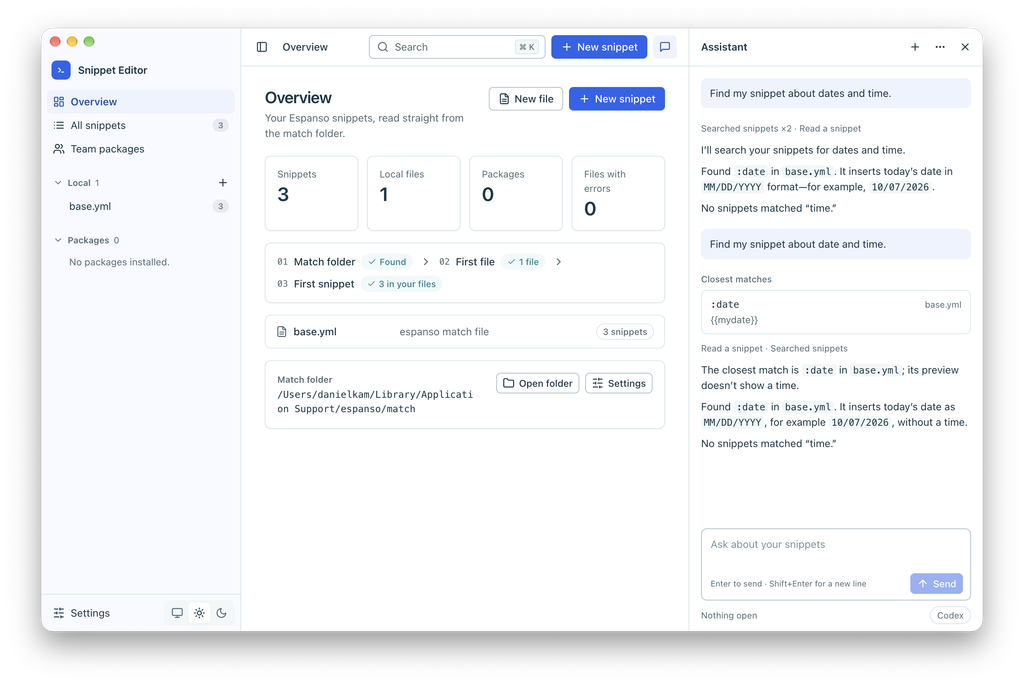
I built Snippet Editor for Espanso to browse, search, and edit my snippets in a desktop app, with an AI assistant alongside them.
Why I moved from TextExpander to Espanso
I’d been using TextExpander for almost six years. It was a great tool, but I didn’t use it enough to justify the full price. So I started looking for another way to keep using my snippets.
Espanso is an open-source text expander. It replaces a shortcut you type with a saved piece of text. That could be an email reply, a link, or anything else you find yourself typing repeatedly.
Espanso’s file-based configuration was the part I found cumbersome. Updating snippets meant working with configuration files, and I wanted a visual editor for that everyday task. I also wanted a way to share snippets across a team.
So I built an editor.
What the editor does
The editor brings match files and installed packages into one sidebar. You can edit triggers and expansion text, search across snippets, and preview the YAML configuration before saving. Raw YAML editing is available when you need it.
For team snippets, it connects to a GitHub repository of shared packages. You can install packages and propose your own files for a pull request.
An AI assistant beside your snippets
The embedded assistant can find and explain existing snippets or draft new ones. Suggested changes appear for you to review and apply. AI changes also need the “Let AI tools change snippets” setting switched on.
It supports Claude Code, Codex, and Ollama backends. Claude Code and Codex send relevant text to their providers. Ollama can keep it local when you use a local model.
Try Snippet Editor for Espanso
The source setup requires Node.js 22 or newer. The README includes a demo command that uses sample files instead of your real Espanso folder.
Follow the setup instructions in the project README to try it: